Your client buys hours. You track them from inside their own site.
TimeGuard Pro installs on your client's WordPress, deducts their hours in real time and shows them in a private portal. You log in, track, bill and leave. No second tab, no spreadsheet, no arguments. And the part they shouldn't touch, they don't even see.
Billed annually · their data on their server · cancel anytime
Solé Bakery
You sell hours. But you never really know how many you've burned.
And while you do the math in your head, money leaks out of places you never look.
You give away hours without seeing it
You work 3 extra hours a month on every client. You don't log them, you don't bill them. Multiply by your client base and you'll know exactly how generous you are each year.
The two-tab dance
Their site open to work, your dashboard open to clock in. You jump between the two… until the day you forget to hit play. That hour is gone for good.
"How many hours do I have left?"
If your client has to ask, you've already lost credibility. When they can't see it in real time, they question every invoice and every extra hour you charge.
You always find out too late
By the time you notice they went over the pack, you've already done 10 more hours. And chasing a job from three weeks ago is awkward: they push back and half the time you eat the cost.
Yet another monthly SaaS
You already pay for hosting, the page builder, backups, SEO… and now $20–50/mo for a generic timer that doesn't get your business? That's salt in the wound.
Nothing is built for this
Toggl, Harvest, Clockify are great for teams billing projects by the hour. But they have no idea what "a 10h pack with a client portal and a WhatsApp alert" means.
a year. 3 unbilled extra hours × 15 clients × $50/hour. That's the cost of doing great work and billing by guesswork. TimeGuard costs a fraction of that, flat per site.
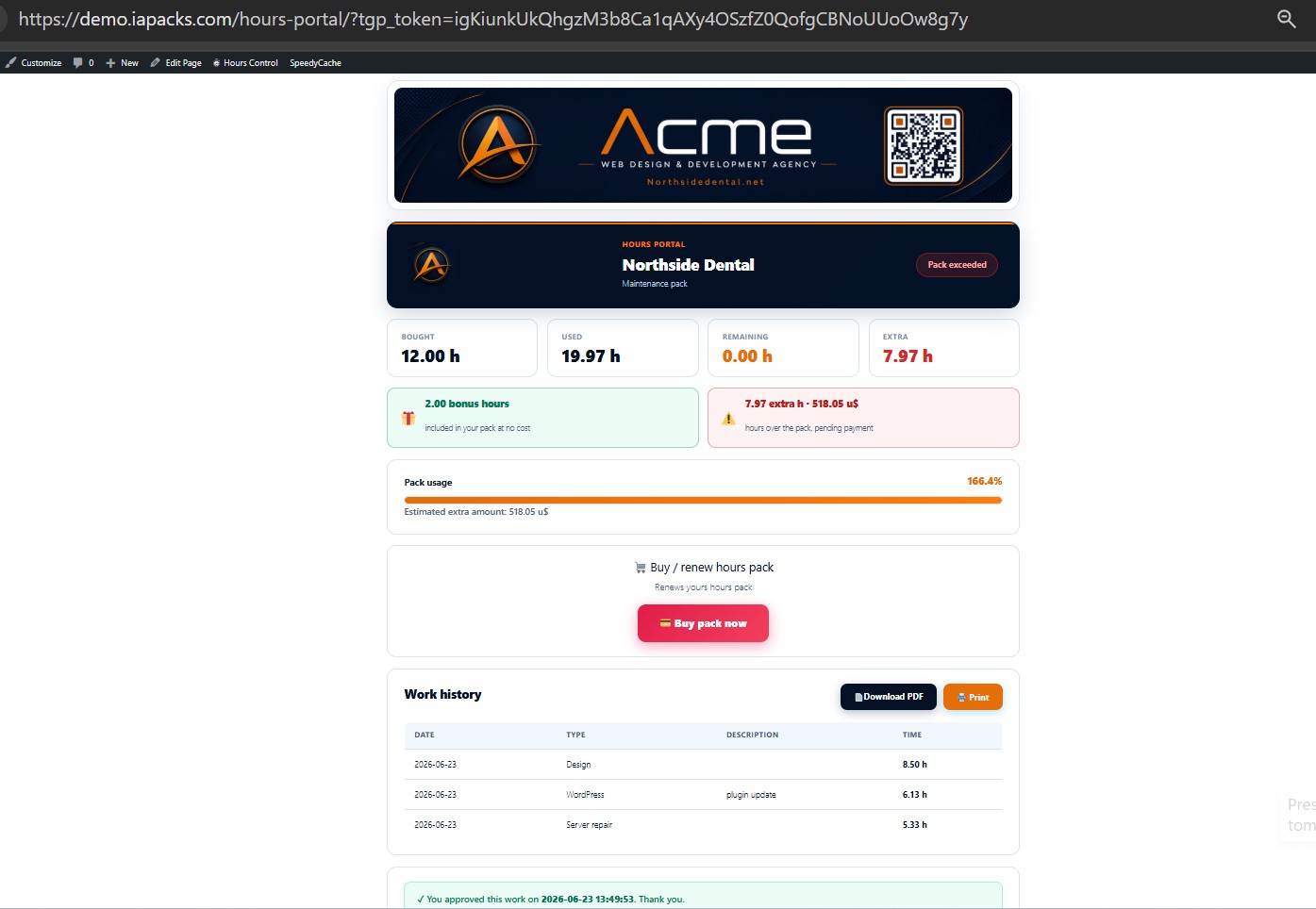
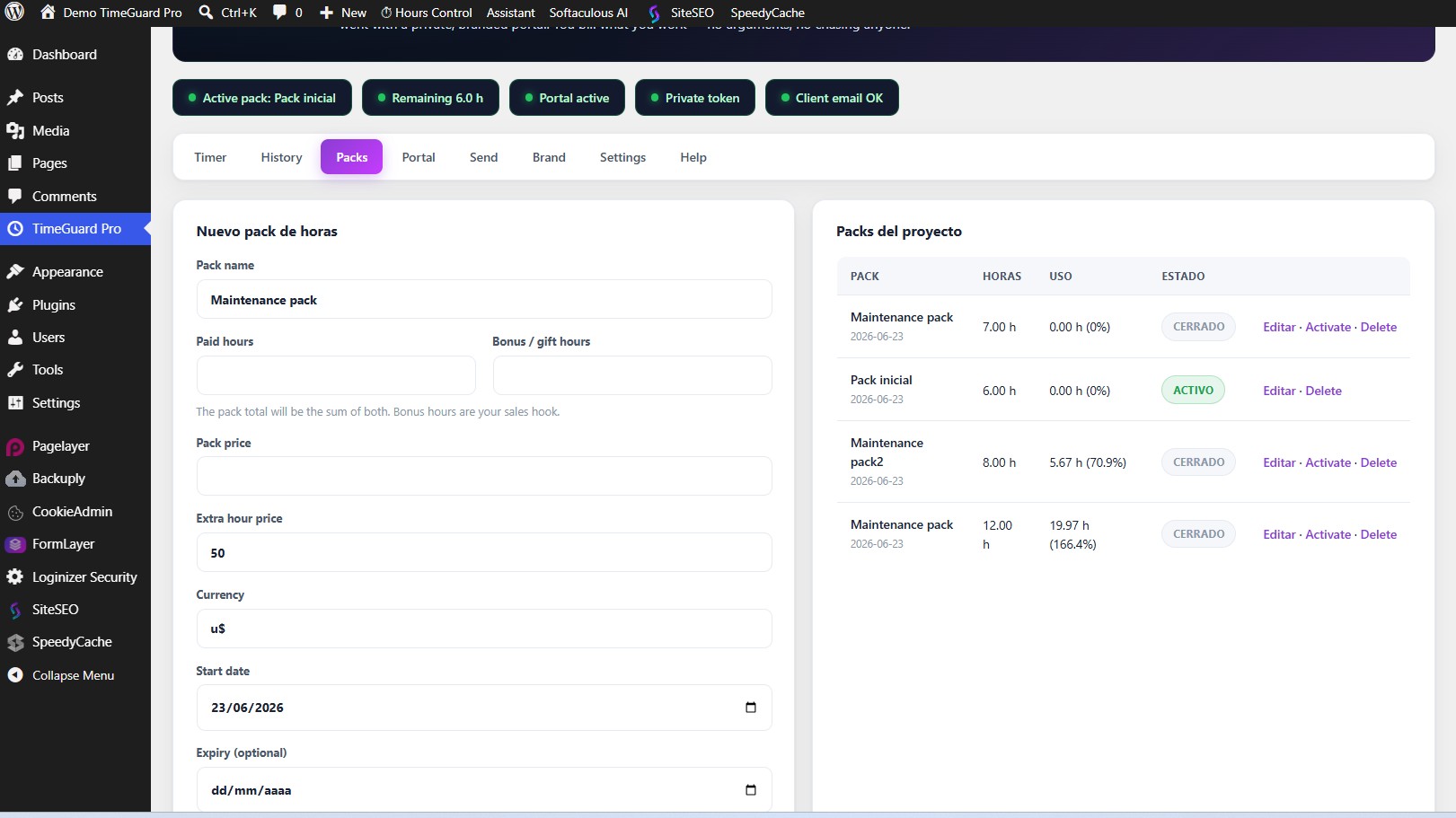
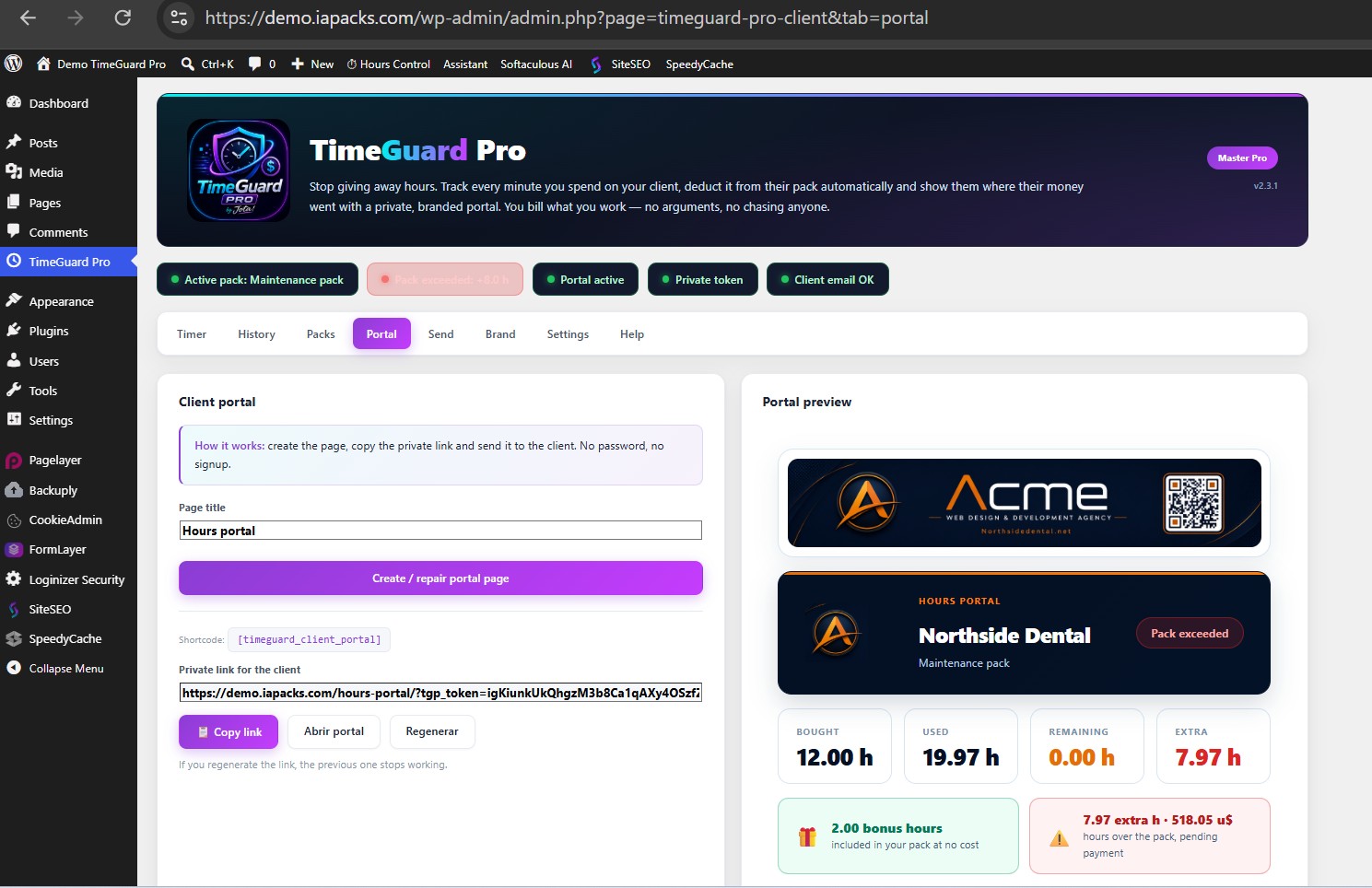
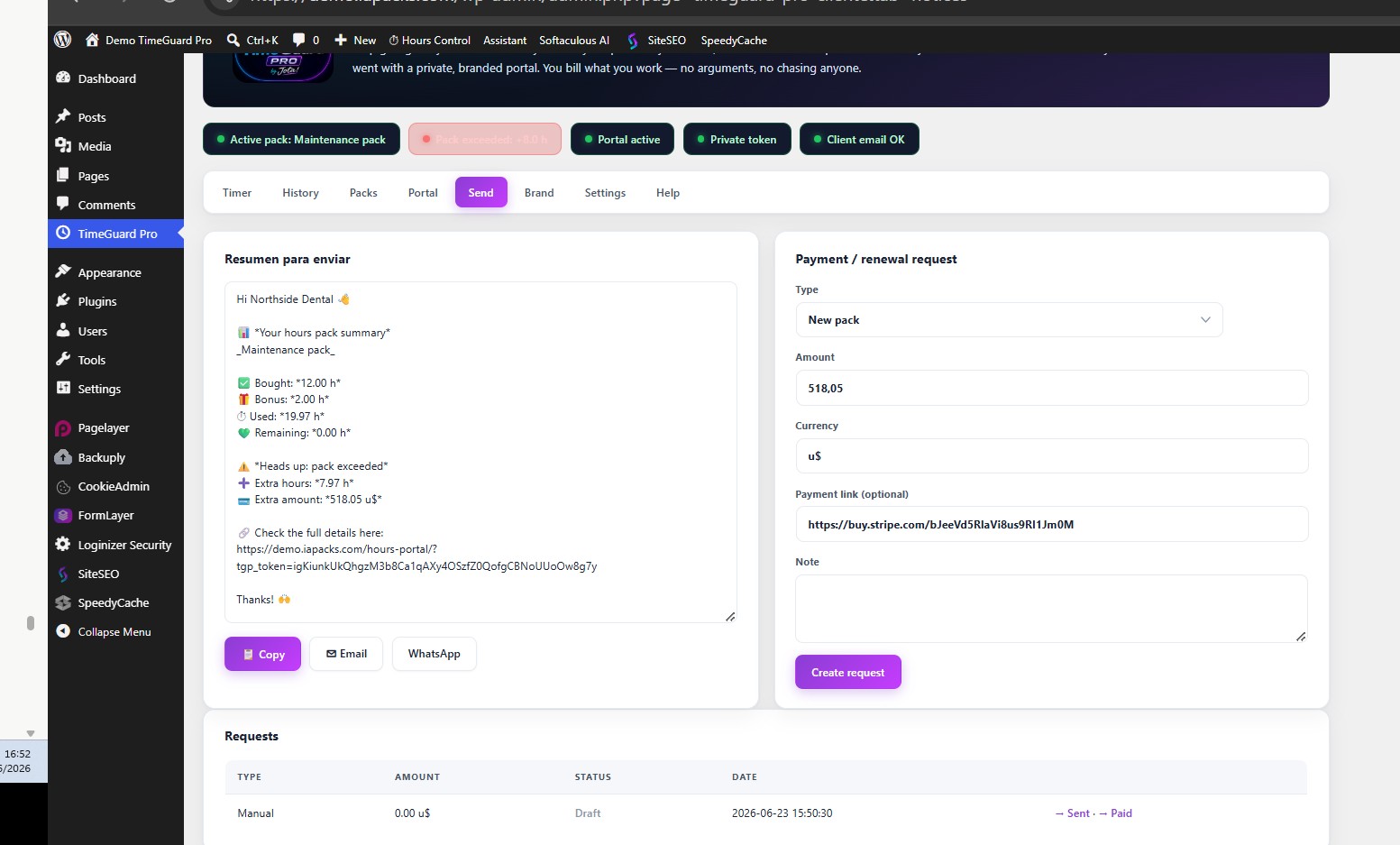
Not mockups. The actual plugin.
This is exactly what you see and what your client sees. Screens rotate on their own — or tap the dots to jump.




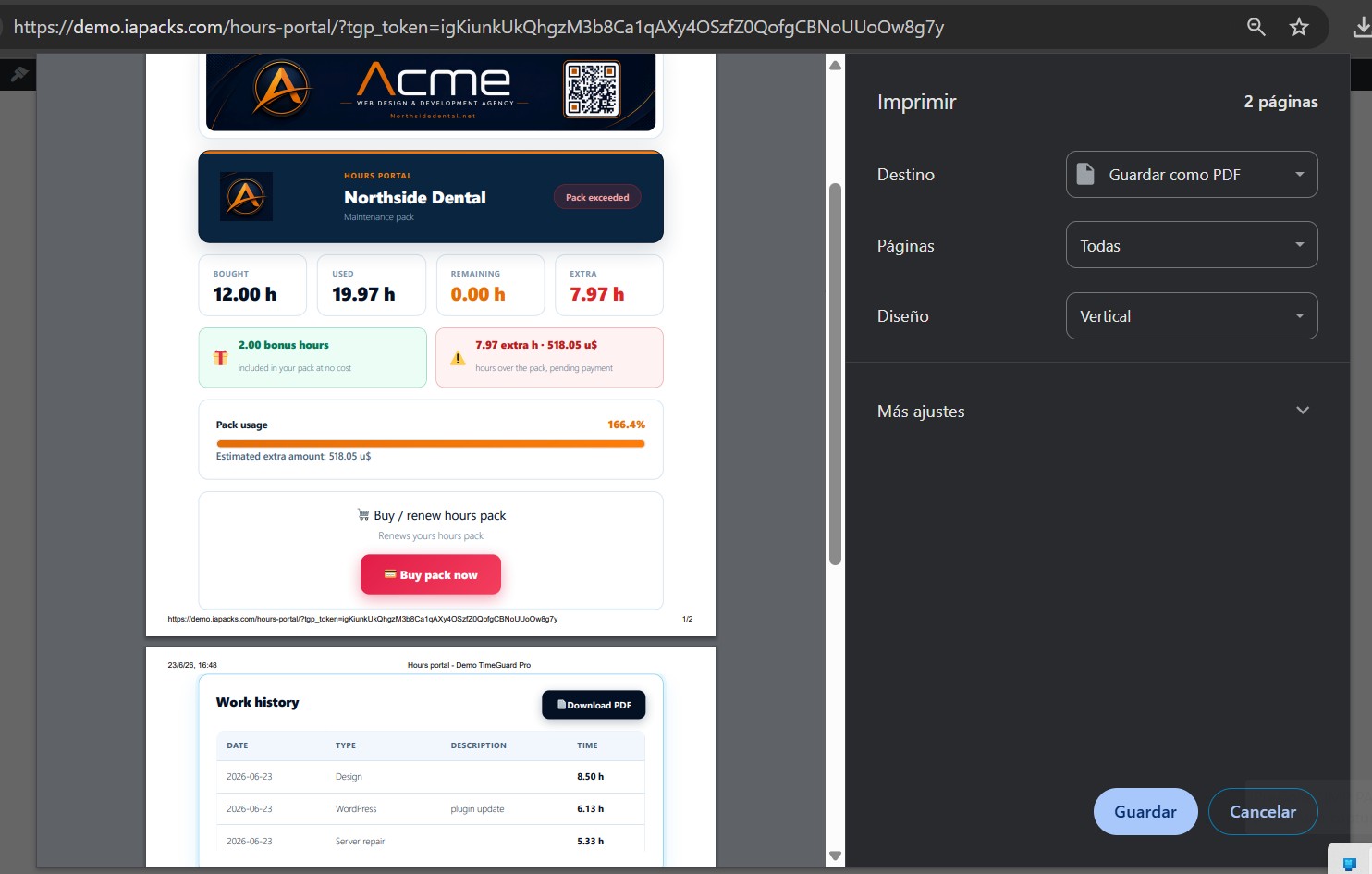
🚀 Don't take our word for it. Try the real plugin.
Spin up your own temporary workspace — upload your logo, set your colors, log hours, open the client portal and download a PDF. It lasts 15 minutes and wipes itself. No signup, no card.
Five steps. And after the second, you barely touch a thing.
Install & hide
Upload the plugin to your client's site and lock it to your account. It vanishes from their view, even if they're an admin.
Log in & track
When you work on their site, you're already inside. Timer with autosave, or log hours and minutes manually. No second tab.
Auto-deducts
Every job is subtracted from the pack automatically. You don't keep count — the plugin does. Prepaid packs queue up.
The client sees it
You send them a private link. They see usage in real time, bonus hours, and approve the work with their signature and date.
Renew & get paid
When hours run out, Stripe, PayPal or Wise buttons sit right in their portal. They renew from their own site — no chasing.
Everyone else lives on YOUR side. This one lives on the client's.
Lives on their site, not yours
No more dual dashboards. You work where you already are. Time tracking sits where the work happens.
Invisible to the client
Lock the panel to your account and, if you want, hide it even from the plugins list. It's there, it works, and they have no idea.
Your brand, not mine
Your own logo, your colors, no one else's credits. The client sees your brand end to end — including the PDF and emails.
Your data, not ours
Their data lives on their server, under their domain. Nothing goes to a third-party cloud that could shut down tomorrow.
Ships in 6 languages — and adapts on its own.
TimeGuard detects each WordPress site's language and shows itself accordingly — admin panel, client portal, PDF and emails. No switch to flip, no setup. Your German client sees it in German, your French client in French. And it's translation-ready for any other locale.
You decide what each client sees. And you never miss a payment.
It's not "all or nothing." Each install adapts to how you work with that specific client.
Fully hidden mode
The client sees absolutely nothing. The plugin works silently and you manage everything. Ideal for pure maintenance.
Read-only mode
The client views their usage and history but can't touch anything: not the timer, not the packs, not the settings.
Queued packs
Client pays before running out? Create the new pack as "queued" and it activates on its own when the current one runs dry.
Bonus hours
Add complimentary hours to a pack as a sales hook. The client sees them marked as a gift in their portal.
Transparent breakdown
The portal shows paid hours, bonus hours and the extra to pay with the exact amount. Zero disputes.
One-click access
An "Hours" button in the top admin bar takes the client straight to their portal. No long URLs, no losing the link.
You install it on YOUR clients' sites. That's why it's locked down.
The client only sees what you want them to: their usage, their jobs, their pay button. Not a single bolt more.
🛡️ Genuinely audited, not just claimed
TimeGuard went through a full security audit before launch. Because a plugin that lives on your client's site can't afford a single hole.
Look enterprise without being one.
Every one of these comes in every plan. The only thing that changes between tiers is how many sites you can install it on.
Branded PDF report
The client downloads their printable report with your logo and colors. Professional proof without lifting a finger.
Signed approval
The client confirms the hours and it's sealed with their IP and date. The end of billing disputes.
Branded emails
Alerts at 75% and 100% and an automatic monthly report, in your brand. The client knows when to renew before you ask.
In-portal payments
Stripe, PayPal and Wise as buttons right inside their site. Renew the pack without leaving — no wire transfers.
WhatsApp with the numbers
One button opens a pre-written, formatted message with hours used, hours left and the amount. You just hit send.
Built-in anti-ticket help
21 FAQs and guides inside the plugin, visible only to you. They answer questions before they reach your inbox.
Email delivery check
Confirm it actually sent, from your side. One-click test, the real SMTP error if it fails, and a log of your last 20 client emails. No more guessing why an alert never arrived.
Same features in all of them. Only the number of sites changes.
No feature gating, ever. Same features on every tier — only the number of client sites changes. Pick based on how many clients you have today — and upgrade a tier as you grow.
- All features, no cuts
- White label + logo + colors
- 6 languages built-in
- PDF report & signed approval
- Stripe / PayPal / Wise payments
- Stealth mode & owner lock
- Lifetime updates · email support
- Exactly the same features
- White label + logo + colors
- 6 languages built-in
- PDF report & signed approval
- Stripe / PayPal / Wise payments
- Stealth mode & owner lock
- Lifetime updates · email support
- The same complete features
- For client portfolios
- Branded portal per client
- 6 languages built-in
- Stripe / PayPal / Wise payments
- Stealth mode & owner lock
- Lifetime updates · email support
- The same complete features
- Unlimited installs
- Branded portal per client
- 6 languages built-in
- Stripe / PayPal / Wise payments
- Stealth mode & owner lock
- Lifetime updates · email support
Cancel anytime. No per-client fees, no feature gating, ever. Compare it to generic SaaS timers at $20–50/month per seat — this is flat, per-site pricing.
Still not sure? Try the live 15-minute demo first →
Lifetime updates · 30-day money-back guarantee · powered by Freemius
Try it for 30 days. Risk entirely on me.
Install it, set up a client, run the timer, hide the panel. If it doesn't pay for itself in the first month, ask for a full refund within 30 days — no questions, no forms, no hard feelings. The only way you lose is by keeping billing your hours from memory.
The doubts that stop a purchase, answered.
Does it work with any WordPress theme?
What if my client has a caching plugin?
What if the client deactivates the plugin?
Does my client need an account or anything?
How do I log time? Any weird decimals?
What languages does it support?
Is it safe to install on my clients' sites?
Let's be honest: this isn't for everyone.
TimeGuard does one thing better than anyone: track maintenance hours from inside the client's own site, invisible to them. But I want you to invest with your eyes open.
✓ It's for you if…
- You run retainers or hour packs for a handful of clients.
- You're sick of spreadsheets and the two-tab dance.
- You want your client to see their usage without touching it.
✕ It's not for you if…
- You manage 50 sites and want one central dashboard for all.
- You need a team timer with timesheets and roles.
- You need tax invoicing and full accounting.
- Your client doesn't use WordPress.
Stop giving away hours you already worked.
Install it today. In 15 minutes you'll have your first client set up, the timer running and the panel hidden from their eyes.
30-day money-back guarantee · no questions asked · powered by Freemius
IA Packs Plugin Suite™ · © 2026 Quintessence Consulting Group LLC. All rights reserved.
Disclaimer: IA Packs Plugin Suite is a collection of automation, productivity, SEO, booking, time tracking and client management tools for WordPress. Users are responsible for generated content, publishing frequency, AI/API credit usage, client data management, legal compliance and compliance with platform, payment provider and search engine guidelines. No ranking, indexing, traffic, revenue, booking, payment, AI recommendation or operational outcome is guaranteed.
License & Use: Licensed according to your plan. White-label customization allows appearance customization for end clients but does not transfer intellectual property rights over the source code, architecture, algorithms, product logic, documentation or brand assets.
Restrictions: Redistribution, resale, sublicensing, reverse engineering, decompilation, license circumvention, unauthorized sharing or extraction of source code is prohibited without written authorization from Quintessence Consulting Group LLC.
iapacks.com · Premium WordPress Plugins & Tools · Built by Jota Santos